
PowerShell/Pester - Make sure your parameters are separated by an empty line

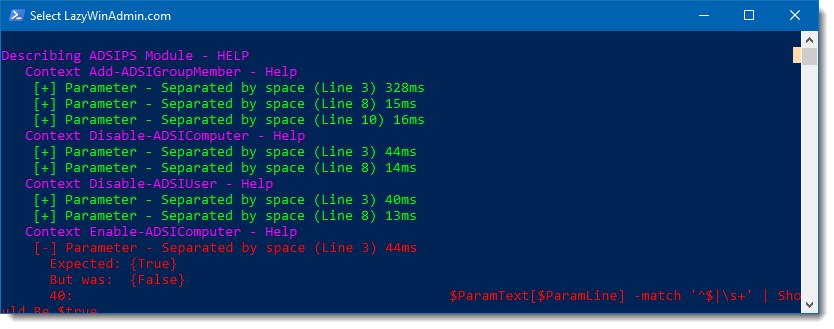
Today, I continue with another post on Pester. I want to check that each of my parameters declared in my PARAM() block is separated by a empty line.
This will help bring clarity to my code and make it easier to read for other people.
Example
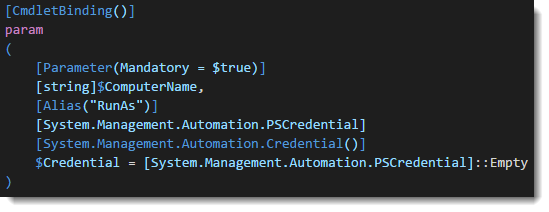
Here is an example,I don’t want this:
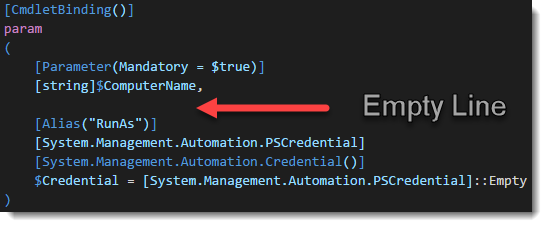
Instead,I want all the comment based help in that format (with an empty line between each parameters)
Code
This can be accomplish by something like that:
[CmdletBinding()]
PARAM (
    $ModuleName = "ADSIPS",
    $GithubRepository = "github.com/lazywinadmin/"
)

# Make sure one or multiple versions of the module are note loaded
Get-Module -Name $ModuleName | remove-module

# Find the Manifest file
$ManifestFile = "$(Split-path (Split-Path -Parent -Path $MyInvocation.MyCommand.Definition))\$ModuleName\$ModuleName.psd1"

# Import the module and store the information about the module
$ModuleInformation = Import-module -Name $ManifestFile -PassThru

# Get the functions present in the Manifest
$ExportedFunctions = $ModuleInformation.ExportedFunctions.Values.name

# Testing the Module
Describe "$ModuleName Module - HELP" -Tags "Module" {
    FOREACH ($funct in $ExportedFunctions)
    {
        $FunctionContent = Get-Content function:$funct
        $AST = [System.Management.Automation.Language.Parser]::ParseInput($FunctionContent, [ref]$null, [ref]$null)

        Context "$funct - Help"{

            # Parameters separated by a space
            $ParamText = $AST.ParamBlock.extent.text -split '\r\n' # split on carriage return
            $ParamText = $ParamText.trim() # Trim the edges
            $ParamTextSeparator = $ParamText | select-string ',$' #line that finish by a ','

            if ($ParamTextSeparator)
            {
                Foreach ($ParamLine in $ParamTextSeparator.linenumber)
                {
                    it "Parameter - Separated by space (Line $ParamLine)"{
                        $ParamText[$ParamLine] -match '^$|\s+' | Should Be $true
                    }
                }
            }
        } #Context
    } #FOREACH
} #Describe
Step by Step
So what is happening here ?
- #1 - Using Abstract Syntax Tree (AST), we retrieve the content of the
PARAM()block and split on the carriage return character
$ParamText = $AST.ParamBlock.extent.text -split '\r\n'
- #2 - We trim the edges of each lines
$ParamText = $ParamText.trim()
- #3 - We find the line that finish by a comma character
,.
Here we are using Regex and the Dollar sign $ that will matches the ending of a line.
$ParamTextSeparator = $ParamText | select-string ',$'
- #4 - Then for each lines that finish by a comma character, we will check if the next line is empty or contains only white spaces, which is fine too. Again we will be using regex here,
^$matches an empty line and\s+matches one ore more whitespaces. This should return either$trueor$falseand we can use Pester from here to return the success of failure of the test.
$ParamText[$ParamLine] -match '^$|\s+' | Should Be $true
Leave a comment